InShot download for android 13 (Tiramisu)
APK file InShot compatible with Android 13How to install APK / APKS / OBB file on Android



InShot - A professional video and photo editor that helps you create beautiful videos and amazing photos. With InShot, you can add music to videos , trim videos , cut videos , merge videos , add text to videos, and blur backgrounds!
InShot is also a photo editor and photo collage maker . Edit photos and selfies, remove backgrounds, add filters, adjust HSL, and more. Create stylish covers and stories for Instagram.
Features:
AI Video Editor
- AI Effects. Instantly enhance images and videos with AI presets.
- Auto Captions. Convert speech to text with AI and edit videos more easily.
- AI Speech. AI text-to-speech in multiple languages and voice styles.
- Auto Background Removal. Remove backgrounds from videos and photos with just one tap.
- Smooth Slow Motion. Enjoy smooth slow motion for amazing videos.
Full-Featured Video Editing
- Trim/Join Clips. Combine and compress videos without losing quality.
- Reverse Videos.
- App for editing videos and adding text, emojis, and InShot-exclusive stickers.
- Create videos with photos and music.
- Add voice effects in various styles.
- Keyframe editing. Add custom animations with keyframes.
- Picture-in-picture. Create videos with multiple layers.
- Blending. Combine your video with blending modes.
- Color picker. Choose any color from the screen and apply it to the background or text.
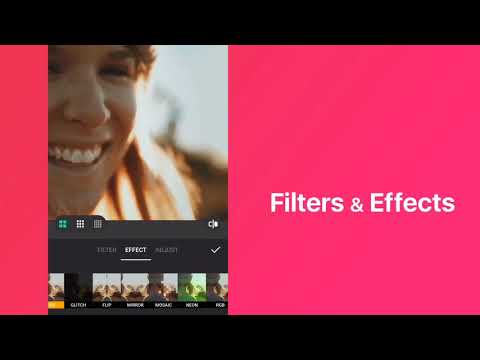
Filters, effects, and transitions
- Photo and video editor with a wide range of cinematic filters.
- Adjust video brightness, contrast, saturation, and more. Customizable video filters and effects.
- Unique effects like Glitch, Fade, Noise, Beats, Weather, Retro DV, Celebrate, and more.
- Professional editing app with spectacular transitions. Combine two clips with transition effects.
Photo editor and collage maker
- Use the InShot video editor to easily blur the background.
- Over 1000 stickers, memes, texts, and backgrounds.
- Turn blurry photos into HD with the AI Photo Enhancer .
- Effortlessly remove unwanted objects.
- AI Flash and Backlight. Use AI Light to illuminate your portraits like a pro.
- Easy-to-use grid collage maker. Up to 20 photos and over 100 highly editable layouts.
- Beyond the grid: Explore collage modes like Freestyle, AI Blend, and Pic Stitch.
Canvas and background
: Choose from various background patterns or upload your own images.
- Adjust the video aspect ratio for Instagram, TikTok, and YouTube posts.
Easy to share
: Custom video export resolution. The professional HD video editor supports 4K export at 60fps.
- Share your daily life: Instagram Reels, TikTok, WhatsApp Status, YouTube Shorts, etc.
InShot is a video and photo editing app. With InShot, a video maker with music, you can easily create basic videos and even advanced projects like video collages, smooth slow motion, stop motion, reverse videos, and much more. Share your vlogs on social media to get more likes or edit videos with music and images for TikTok.
Do you have any questions about InShot (free slow-motion video editor with music and photo slideshow maker)? Contact us at inshot.android@inshot.com.
For more tutorials on new features and advanced video editing tips, subscribe to our YouTube channel: https://www.youtube.com/@InShotApp.
Disclaimer:
InShot is not affiliated with, associated with, sponsored by, or endorsed by YouTube, Instagram, TikTok, WhatsApp, Facebook, or Twitter, nor does it have any official connection with these platforms.
- New effects pack: Fantasy
- Bug fixes and other improvements
Any ideas or suggestions? Don't hesitate to contact us anytime at inshot.android@inshot.com!
For more new feature tutorials and advanced video editing tips, please subscribe to our YouTube channel: https://www.youtube.com/@InShotApp
- LicenseFree
- File nameInShot
- File Version2.250.1556
- Package namecom.camerasideas.instashot
- Size87.42 MB
- UploadedNovember 13, 2026
- Android8.0 or later
- CategoryPhotography
- DeveloperInShot Video Editor
- Developer site
- Developer emailinshot.android@inshot.com
- md5 hashb4ecb4a5be8758e158496b4ffdfd005a
- Architecturearm64-v8a armeabi-v7a
- Permissionsshow (22)